
Getting started · Account access
Log in to UpVote
Choose the right login for the Admin Portal or volunteer access, then follow the verification steps.
System administrator
Use your admin email and password, then verify with a one-time code sent to an authorized phone number or email.
Admin login steps →Volunteer or caller
Use the phone number or email registered to your volunteer account, then enter the one-time code.
Volunteer login steps →1. Log in to the Admin Portal
- Choose System Administrator. Open the login page and select the administrator option.
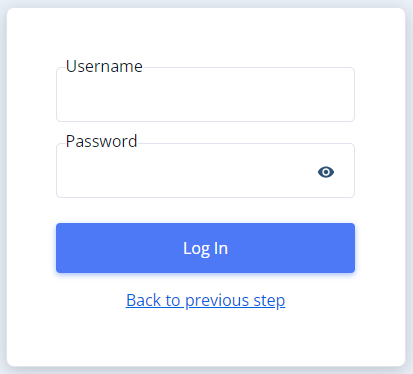
- Enter your admin credentials. Use the email address and password provided when your admin access was set up.
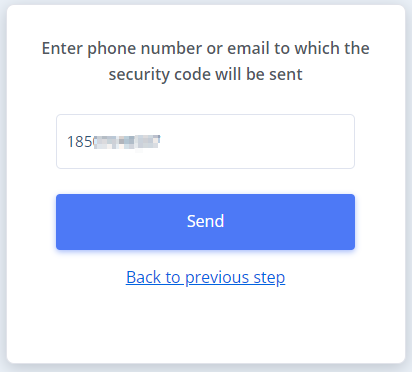
- Choose an authorized verification destination. Enter the phone number or email authorized for your account to receive a security code.
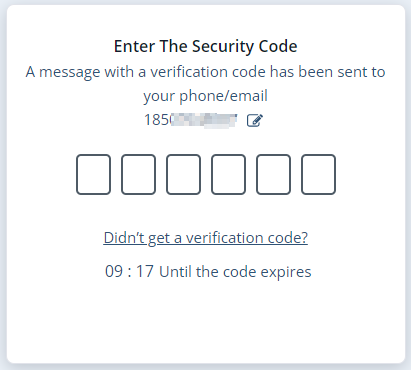
- Enter the temporary code. Use the code sent to that phone or email to complete login.
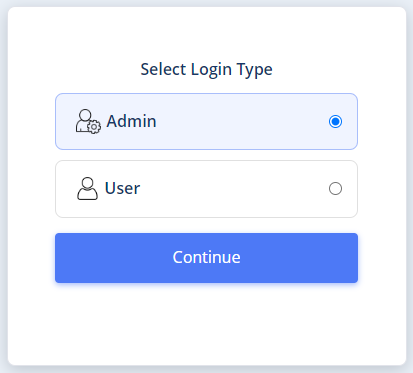
2. Log in as a volunteer or caller
In the UpVote app, use the mobile number registered with your campaign. On the web login page, choose the user option and follow the available phone or email login flow.
- Confirm your account exists. Your campaign must add you as a volunteer before you can receive a login code.
- Enter your registered details. Use the mobile number for app login, or the registered phone number or email requested by the web login screen.
- Enter the one-time code. Check the phone or email you used, then enter the code to finish logging in.
See the web user-login screens
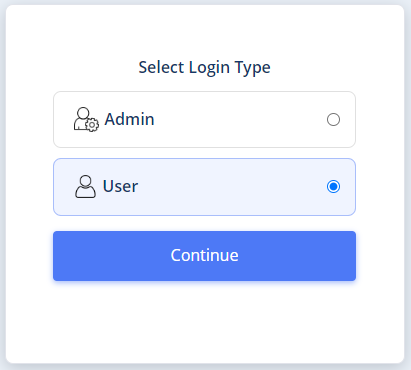
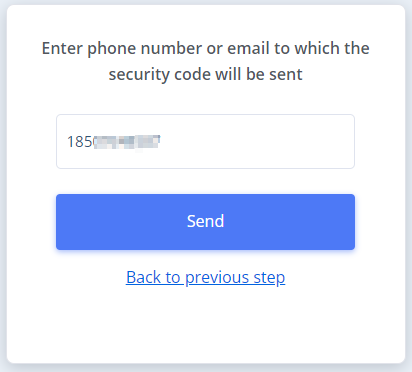
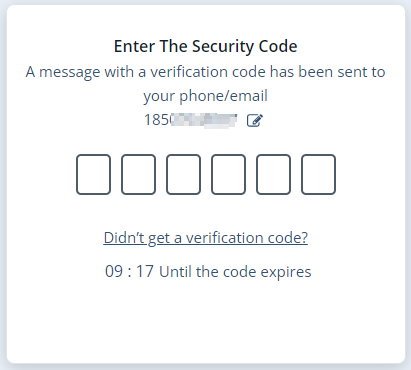
Admins need a volunteer account to use the app, too. Admin Portal access does not automatically create a volunteer account. Ask your campaign admin to add your mobile number, or add yourself as a volunteer if you manage account setup.
Having trouble logging in?
I did not receive a code
Check that the account exists and the phone number or email matches the registered or authorized details. Check text messages, filtered messages, and your email spam folder as appropriate.
For missing SMS codes, campaign admins should check the credit balance and message history. Follow the Admin SMS credits guide .
My admin email or password is not working
Confirm that you selected System Administrator and are using your admin credentials. If you still cannot log in, contact your campaign administrator or UpVote representative for help with account access.
I downloaded the app but cannot get in
Downloading the app does not create a campaign account. Ask your campaign team to confirm that you have been added as a volunteer with the mobile number you are entering.
Watch the admin login walkthrough
Screenshots and the tutorial show an earlier interface. Labels and layout may differ. Tap a screenshot to enlarge it.